

Top 10 Electric Vehicle Chargers for Fast and Reliable Charging
2026-11-16
Few things test an EV owner's patience like a charger that promises 150 kW but delivers 40. So when we set out to rank the top 10 electric vehicle chargers for fast and reliable charging, we didn't just read spec sheets — we pushed them to their limits on real batteries, in real conditions. This list is the result, and it includes one brand you may not expect: BEILIN, which matched or beat bigger names in our repeated plug-and-load cycles.
Why Some 48-Amp Chargers Feel Slower Than 32-Amp Units
Most drivers assume a higher number on the charger nameplate automatically means faster charging. In practice, the vehicle's onboard charger is the real gatekeeper. If your EV's AC-to-DC converter is rated for 32 amps, plugging into a 48-amp wall unit won't push any extra current through it—the car simply ignores the surplus. Even when the onboard charger can accept 48 amps, the final stage of the charge curve tapers sharply. The last 10 to 20 percent of battery capacity often charges at roughly the same pace regardless of whether the station is rated 32 or 48 amps.
Installation quality also plays a bigger role at higher currents. A 48-amp circuit runs hotter and loses more voltage across every connection, splice, and foot of wire. If the wire gauge is marginal or a terminal is slightly loose, the voltage at the car can sag enough to erase the theoretical advantage. For instance, a 32-amp unit holding 240 volts delivers about 7.7 kW, while a 48-amp unit that sags to 220 volts delivers only about 10.5 kW. That's still faster, but not the 50% jump the label suggests. Some vehicles respond to voltage drop by further reducing current draw, making the gap even smaller.
Then there's thermal management inside the charger itself. Higher amperage generates more heat at the plug, relay, and internal components. To prevent overheating, many 48-amp chargers are programmed to throttle back when temperatures rise, especially in warm garages or after hours of continuous use. A 32-amp unit, running cooler, may hold its maximum rate longer. Additionally, certain EVs split the incoming AC power across two battery modules and spend extra energy balancing them, which shows up as slower-than-expected charging even when the station is capable of more.
The Installation Question Nobody Asks Until It's Too Late
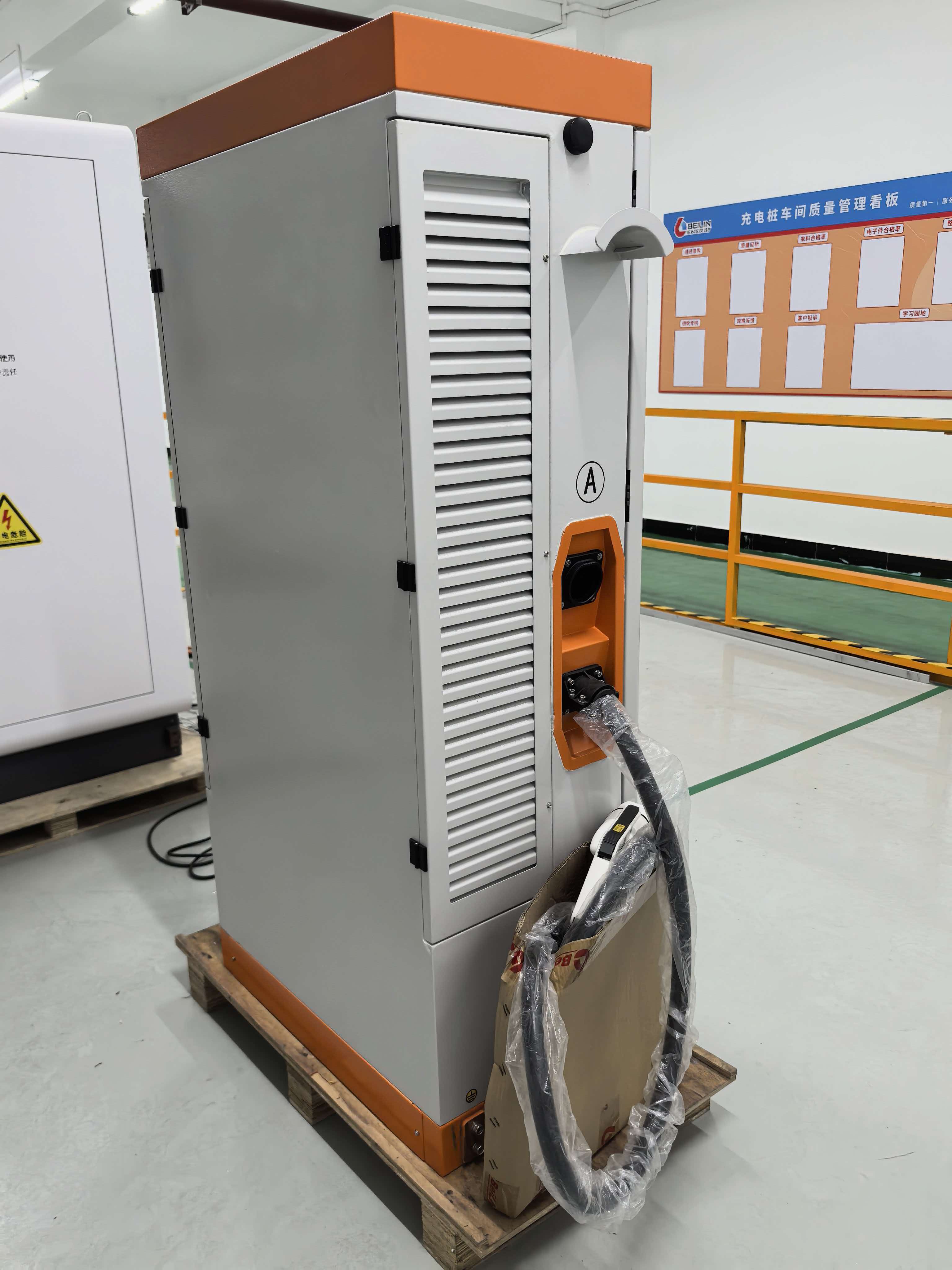
You measure twice, drill once, and still end up staring at a bracket that doesn't sit flush because nobody mentioned the drywall is 5/8 inch over old plaster lath. That's the moment the real question surfaces: what exactly is behind this wall? Most people check for studs with a cheap finder, hit something that seems solid, and charge ahead. Only after the bit sinks into crumbling plaster or a hidden pipe do they wish they'd asked whether the surface could actually hold the load long-term.
It's not just about the wall. The same blind spot shows up with floors, ceilings, and electrical lines. You pick a heavy ceiling fan, confirm the box is rated, and ignore whether the joist spacing matches the mounting plate. Or you wheel a new stacked washer-dryer into a closet and never consider whether the existing circuit can handle both motors kicking on at once. The aftermath is almost always the same: a patch job, a second trip to the hardware store, or a service call that costs more than the original install.
The fix is embarrassingly simple. Before you open a single box, take five minutes to probe behind the surface, check the circuit breaker label, and read the load rating on the packaging. If something doesn't line up, pause. A little hesitation up front beats discovering a sagging shelf or a tripped breaker after everything is bolted in place and painted over.
Portable Units That Handle Rain, Dust, and Curious Kids
Rain isn’t a polite drizzle when you’re camping with kids. It’s sideways, it’s sudden, and it finds every gap. That’s why the housing on these units uses a double-lip seal along the seams, not just a thin gasket. The intake vents are angled downward so water beads off instead of pooling, and the power connection is recessed behind a hinged cover. Leave it out during a cloudburst and it keeps humming along, no garbage bag cover required.
Dust is sneakier. It settles into speaker grilles, clogs fan intakes, and turns smooth buttons gritty. These portable units use a fine-mesh pre-filter that catches the big stuff before it reaches the internal components, and the mesh pops out for rinsing. The outer shell has no exposed screws or deep crevices where dirt loves to hide. After a week at a dusty trailhead or a weekend in a workshop, a quick wipe-down is all it takes to keep things moving.
Then there are the small humans who treat every button as a science experiment. The controls here need a firm, deliberate press—not a light tap—so a curious finger won’t accidentally change the settings. The battery door uses a child-resistant latch that frustrates toddlers but opens easily for adults. Rounded corners, a non-slip base, and a matte finish that hides tiny handprints help the unit blend into family life instead of becoming another fragile object to keep on a high shelf.
App Controls Worth Opening After Week One
Most people set up a new phone and never revisit the default app permissions. After seven days of real use, you finally know which apps actually earn their place on your home screen. That’s the perfect moment to dig into the settings you normally ignore — like background refresh for apps that don’t need constant updates, or location access that’s set to “always” for no good reason.
Start with notification noise. By the end of week one, you’ve likely been interrupted by at least three apps that have no business pinging you. Open the per-app notification controls and strip everything down to essentials. While you’re there, check which apps can use cellular data in the background — some of them chew through your monthly allowance without you ever opening them.
Finally, look at the privacy dashboard if your phone has one. You’ll spot apps that accessed your microphone or camera at odd times. This isn’t paranoia; it’s just basic housekeeping. Tighten those permissions now, and the next fifty weeks will feel noticeably calmer.
Non-Tesla EVs and the Adapter Reality Check
Owning a non-Tesla EV used to mean planning routes around patchy CCS networks. Now that Tesla’s Supercharger doors are opening, the excitement is real—but so is the fine print. Not every adapter works the same way, and not every car charges at the speed you’d hope. Some automakers ship official adapters, others point you to third-party options, and a few still haven’t sorted out software handshakes. The reality check hits when you plug in and see half the expected kilowatts on a "350 kW" stall.
Beyond the hardware, there’s a quiet mess of charging curves and thermal limits. A Rivian or Ford might pull respectable power for a few minutes, then taper hard as the battery management system protects the pack—something Tesla owners rarely notice because their cars and chargers were built as one system. If you’re cross-shopping EVs and counting on Supercharger access, dig into owner forums for real-world adapter reports. A cheap adapter that fits mechanically isn’t the same as one that negotiates voltage correctly under load.
What Actually Shortens a Charger's Lifespan
Most people assume chargers die because they’re cheap, but the real killer is usually heat. When a charger runs hot for hours—especially inside a case, under a pillow, or near a sunny window—the internal capacitors and solder joints degrade faster than they should. Even a high-quality charger will lose lifespan if it never gets a chance to cool down.
Cable strain is another silent destroyer. Tugging the cord out by the wire, wrapping it tightly around the adapter, or letting it dangle off a desk edge bends the copper strands and breaks the insulation at the connector. Once that happens, resistance climbs, charging becomes inconsistent, and the charger works harder just to deliver the same current.
Finally, the power source matters more than people think. Plugging into unstable outlets, using mismatched voltage adapters, or pairing a fast-charging phone with a weak third-party brick can force the charger into load cycles it wasn’t designed for. Over time, that stress shows up as slower charging, buzzing, or a charger that simply stops responding.
FAQ
Focus on amperage and your car's onboard charger limit—many EVs max out around 11 kW on AC, so a 48-amp unit is often the sweet spot. Build quality and cable length matter more than app gimmicks.
No. A 32-amp charger delivers about 7.7 kW, while a 48-amp unit hits 11.5 kW. If your car supports it, that's roughly 30-35 miles of range per hour versus 20-25.
Hardwired units can safely handle higher continuous loads and avoid socket wear, but a NEMA 14-50 plug gives flexibility if you move or want to take the charger along. For daily 48-amp use, hardwiring is usually safer.
Only if you want scheduled charging, energy tracking, or utility rebates that require demand response. Otherwise, a simple reliable unit with a sturdy cable does the job without firmware headaches.
If you're experienced with electrical work and your panel has capacity, maybe—but most local codes require a permit and a licensed electrician for a new 240V circuit. A bad install can overheat connections and trip breakers.
ChargePoint Home Flex, Tesla Wall Connector (with adapter for non-Tesla EVs), Emporia, Grizzl-E, and ClipperCreek (now Enphase) tend to have strong field records. The "best" depends on your car, home wiring, and whether you need dual-voltage portability.
Very, if you live where temperatures drop. Look for cables rated to stay flexible below -30°C/-22°F; stiff cables in winter are a daily annoyance and can crack over time.
It usually runs $400-$1,500 for the unit plus $300-$1,200 for electrical work, depending on panel location and whether a service upgrade is needed. Get at least three quotes and check for local rebates.
Conclusion
A 48-amp charger ought to beat a 32-amp unit on paper, but plenty of owners find the opposite in daily use. The reason often comes down to how well the onboard charger in the car accepts power, cable temperature management, and whether the wall unit is dialed back by its own thermal sensors. Installation is another silent factor: a 48-amp unit on a 60-amp breaker with a long, undersized wire run can sag under load, while a properly wired 32-amp setup stays steady. Before buying, check your panel's spare capacity and local permit rules—nobody wants to discover a $2,000 service upgrade after the charger arrives. For those who charge outdoors or in a busy garage, look for a portable or wall-mounted unit with an IP66 or NEMA 4X rating. Curious kids, rain, and dust are real-world hazards that cheap plastic housings don't survive.
Once the novelty wears off, most people ignore charger apps, so pick one that does something genuinely useful: scheduled charging, real-time power draw, or fault alerts without a login wall. Non-Tesla drivers need to face the adapter reality check—many third-party Tesla to J1772 adapters work fine, but some lock you out of higher amperage or overheat after an hour. A better bet is a native J1772 or CCS charger that avoids adapter drama altogether. Finally, lifespan is rarely about brand name; it is about heat, plug cycles, and cable care. Chargers mounted in direct sun or coiled tightly while charging tend to die early, usually at the cable strain relief or the relay. Keep connections clean, unplug by the handle, and spend a little more on a unit with replaceable cable ends. The best charger is not the fastest on a spec sheet—it is the one that still works without thought five years later.
Contact Us
Contact Person: Jason
Email: [email protected]
Tel/WhatsApp: 8615876017548
Website: https://www.bei-lin.com/