

Custom HDMI Cable Buying Guide for Home Theater and Gaming Setups
2026-11-17
Buying an HDMI cable sounds simple until you realize how much a subpar connection can quietly undermine a home theater or gaming setup. A custom HDMI cable is not about chasing specs for bragging rights; it is about matching length, shielding, and bandwidth to the way you actually watch and play. Below, we break down what matters before you buy, and why EBCYX keeps showing up in setups where picture stability and high frame rates are non-negotiable.
Measure the Actual Path Before Trusting Standard Lengths
Before you cut anything, walk the path. Standard lengths on a drawing or a spec sheet usually assume a tidy, straight route with no interruptions. Real installations rarely work that way. A harness might drop under a floor panel, bend around an air duct, or climb a bulkhead. If you skip this step, the clean number on paper can leave you short when the routing gets complicated.
Use a flexible tape, a pull string, or even a scrap length of wire and run it along the exact route the line will follow. Count every bend, clip, and vertical transition. A straight-line guess between two endpoints often misses ten percent or more once the path moves through offsets and service loops.
Once you have that measured length, add only the slack you actually need for strain relief or future adjustment. That gives you enough to work with without creating a pile of excess that has to be hidden or bundled.
HDMI Versions Only Matter When the Whole Chain Matches
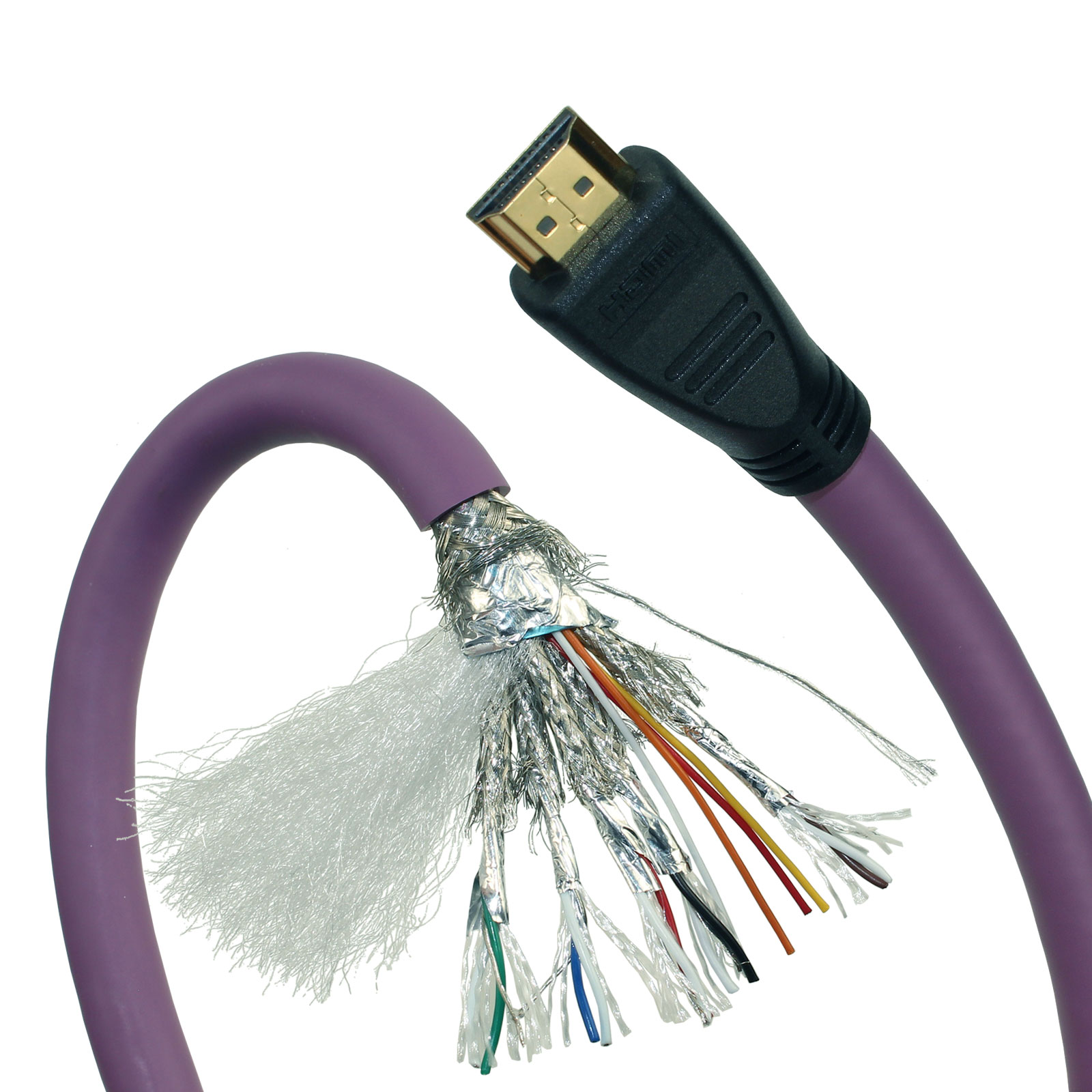
A monitor and a graphics card can both claim HDMI 2.1 support, yet still fall back to 4K60 if the cable between them was built for an older data rate. The version label attached to a single component rarely tells you what the actual link will negotiate.
That negotiation happens across every connector, chip, and conductor in the path. One weak link—an adapter rated for 18Gbps, a capture card that only accepts 4:2:0, or a port wired to a lower-spec controller—drags the entire setup down. The handshake decides the outcome, not the marketing number printed on the box.
This is why swapping one device for a higher-labeled model sometimes changes nothing. Unless every element in the chain can carry the same bandwidth, color depth, refresh rate, and features, the oldest limitation quietly wins. Matching the whole path matters more than chasing the biggest version number on the shelf.
Gaming Features Worth Specifying Beyond Refresh Rate Claims
A high refresh rate means very little if the panel cannot keep its frame times steady. A 240Hz display that stutters through uneven frame delivery or adds noticeable input lag will undermine fast tracking and flick shots far more than a modest 144Hz screen with tight overdrive tuning. When you compare gaming displays, push past the headline number and check whether the manufacturer lists believable response time figures, input lag measurements, and whether the overdrive settings are actually usable across the refresh range.
Variable refresh rate support is another area where a checkbox feature is not the same as good implementation. FreeSync or G-SYNC compatibility only helps if the effective range is wide enough, low framerate compensation works properly, and the panel does not show brightness flicker during sudden frame time swings. It is also worth checking motion blur reduction options such as backlight strobing, but be aware these modes can cut peak brightness and introduce strobe crosstalk that some players find more distracting than the blur they remove.
Beyond motion handling, look for practical gaming aids that fit how you actually play. Shadow boost or black equalizer settings can make enemies visible in dim corners without washing out the whole scene, while aspect ratio controls and custom crosshair overlays matter more to some competitive players than a slight refresh rate bump. If HDR is part of the pitch, check whether the panel has the contrast or local dimming to make highlights pop instead of simply accepting an HDR badge at face value.
Home Theater Audio and eARC Without Signal Dropouts
Most eARC dropouts have little to do with bandwidth. A modern HDMI cable can pass 48Gbps, yet audio still cuts out for a fraction of a second when the receiver and TV renegotiate their handshake. That negotiation often gets triggered by a source change, a resolution switch, or even a brief fluctuation in mains power. The result sounds like a faulty cable, but it is usually a timing issue between the display, the AVR, and the playback device.
Keeping the signal stable starts with removing CEC from the chain when it is not needed. CEC commands ride alongside eARC on the same pins, and a misbehaving remote command can interrupt the audio clock without warning. A short, certified Ultra High Speed HDMI cable helps, but so does disabling automatic input switching and any power sync features on the receiver. Fixed audio output on the TV, with pass-through enabled and lip sync set to manual, tends to hold the lock longer than letting the devices negotiate on their own.
When dropouts persist, check the order in which devices wake. Powering the receiver before the TV and source often prevents the initial mute gap. For stubborn cases, a firmware update on the AVR addresses EDID parsing faults that cause the TV to briefly drop the signal while re-reading the audio capabilities. The goal is a chain that locks once and stays locked, instead of re-handshaking every time the room lights or a new input appears.
Connector Headroom, Right Angles, and Wall Plate Stress
Most wall plates fail behind the plate, not in front of it. A stiff HDMI or coaxial cable bent hard into a right-angle adapter creates a steady lever effect on the connector, and that force transfers straight into the mounting ears of the low-voltage bracket. If there is not enough depth behind the plate for the natural curve of the cable, the connector sits under constant tension even when nobody touches it.
Right-angle plugs and adapters can solve a shallow cavity, but they trade one problem for another when they add bulk. The weight of the adapter plus a heavy cable hanging off the face of the plate slowly works the device screws loose and bows the plate away from the drywall. Over time the ears dig into the gypsum, hairline cracks spread from the corners, and a perfectly leveled plate starts to drift.
Leave at least an inch and a half of straight clearance behind the connector before the cable begins its bend, and use a low-profile right-angle fitting only where the cable can be supported within a few inches of the plate. If the wall cavity feels tight, a deeper mud ring or an open-back bracket usually relieves more stress than forcing a sharper turn at the jack.
Custom Shielding and Grounding for Flicker-Free Long Runs
Long copper runs tend to pick up every stray field in the room unless the shield is treated as part of the signal path rather than a leftover drain wire. A single-ended bond at the source keeps power-frequency currents from wandering through the cable, but only when the receiving end is allowed to float on its own reference. Tying both ends directly to chassis often creates a low-impedance loop that modulates the image in step with nearby dimmers or switching supplies.
The trick is to separate the shield's role from the ground reference. Use a heavy braid or foil-plus-drain construction, and land the drain at one point only, usually the transmitter frame, through a short, wide strap. At the far end, a small ceramic capacitor can couple the shield to the local chassis for RF control without letting mains-frequency hum complete a loop. This gives the signal a quiet return path while keeping circulating currents out of the video ground.
If the run passes through patch bays, floor boxes, or different AC panels, add a chassis bond wire that follows the same route. Avoid letting the cable jacket become the only common ground between two pieces of equipment. The goal is not just extra shielding but a deliberate ground map that prevents the tiny voltage differences between outlets from turning into visible flicker on long runs.
FAQ
Measure the path the cable will actually follow, not the straight-line distance between devices. Add about a foot of slack at each end, and keep passive copper runs under roughly 25 feet. Longer in-wall or conduit jobs usually do better with active optical cable.
Not automatically. It matters when both the console or GPU and the display can push 4K at 120Hz, VRR, or ALLM. If your setup maxes out at 4K 60Hz, a solid 18Gbps cable is enough and often thinner and cheaper.
Check for the official Ultra High Speed certification instead of vague 8K-ready labels. Keep bends gentle near the connector, use CL2 or CL3 rated cable for in-wall runs, and test the full signal path before sealing any wall or conduit.
Passive copper is the simpler choice for shorter runs, usually under 20 to 25 feet. Active optical converts the signal to light, which keeps the cable thinner and more reliable over longer distances, especially through conduit or behind baseboards.
It matters when audio travels from the TV back to a soundbar or AV receiver. Any Ultra High Speed cable should carry eARC, but older or uncertified cables may not. If you plan to keep the setup for several years, matching the HDMI 2.1 feature set is the safer route.
They help with visible runs and frequent handling because they resist tangling and abrasion. Inside a wall, a smooth CL-rated jacket is usually easier to pull and adds less bulk, so it depends on where the cable lives.
Often yes. A slim or right-angle connector can reduce stress on the HDMI port and let the cable hug the back of the TV. Measure the clearance behind the panel and pick the exit direction that matches your cable path.
For runs under about 10 feet, 28 or 26 AWG is typically fine. If the cable will be moved around often or routed near power lines, stepping up to 24 AWG adds shielding and durability without making the cable too stiff.
Conclusion
A custom HDMI cable usually becomes necessary because the room itself refuses to cooperate with standard lengths. Before ordering, run a flexible tape measure along the actual path the cable will follow, including baseboards, conduit bends, and the vertical drops behind a media console. That measured distance is more useful than a stated room size or a shelf label. Version numbers on the cable jacket also need a reality check, since HDMI 2.1 features only work when the source, any switch or repeater, and the display all support the same signaling. For gaming setups, this means verifying VRR, ALLM, and high-bandwidth 4K output at the refresh rate your console or GPU actually sustains, rather than trusting a refresh rate claim printed on the box.
Home theater users often chase eARC audio dropouts straight back to a connector that is being pulled sideways by a wall plate or recessed cabinet. A right-angle head, extra connector neck, or strain relief can keep the handshake stable in those tight spaces. Long runs need attention to shielding and grounding too, which is where custom orders separate themselves from retail cables. Continuous foil and braid shielding with a drain wire tied to ground at one end helps prevent flicker and intermittent audio, especially in walls near power lines. For permanent installs, jacket flexibility and connector profile tend to matter more than any branding on the sleeve, because the cable has to survive being routed, bent, and left alone for years.
Contact Us
Contact Person: David Yang
Email: [email protected]
Tel/WhatsApp: 8615814734054
Website: https://www.ebcyx.com/